Documentation
SYSVOTE · for a fair representation
Introduction
SYSVOTE (v3.0.0) is a web-based electronic voting system built on Jakarta EE (the enterprise Java application development platform). Designed for political parties, institutions, and organizations, it enables the simulation and management of complete, transparent electoral processes.
The platform includes a comprehensive administrative dashboard (automated CSV-based voter enrollment, district mapping), a secure voter portal with flexible ID verification, double-vote prevention, as well as real-time result tracking with automatic election lockout at the end of the countdown.
File Structure
SYSVOTE3.0.0/source_code/
├── src/
│   ├── main/                 # Java sources (Controllers, DAO, Models)
│   └── test/                 # Unit tests
├── target/
│   ├── classes/              # Compiled classes
│   └── sysvote3.0-1.0-SNAPSHOTS/
│       ├── assets/
│       │   ├── css/          # Custom styles
│       │   ├── icons/        # Bootstrap Icons
│       │   ├── images/       # Logos, banners
│       │   ├── js/           # Client-side JavaScript
│       │   ├── plugins/      # Third-party plugins
│       │   └── xhr/          # JSP for AJAX requests
│       ├── META-INF/
│       │   └── context.xml   # Application context
│       ├── WEB-INF/
│       │   └── web.xml       # Servlet/JSP mappings
│       └── *.jsp             # Dynamic pages
├── nb-configuration.xml
└── pom.xml                   # Maven dependencies
Plugins
SYSVOTE v3.0 Uses the following plugins. Visit the links for documentation and updates.
Configuration
- Database server – MySQL recommended (MAMP / WAMP for local).
- Database – Create
electiondataand import the SQL file from the Setup folder. - Application server – Tomcat 10.1.34+ or JBoss.
- Start the Jakarta EE server – Follow your server's documentation.
- Ports – MySQL on
3306(modifiable in the Connexion class). Server on8080. - JDK / JRE – Install the JDK to compile or the JRE to run.
Build
- Without IDE: from the source folder, use:
jar -cvf name.war -C . . - With NetBeans: import the project, Maven downloads dependencies, then build.
- The
.warfile will be generated in the target folder.
Installation
- Start your server (Tomcat, JBoss, etc.) and access the administration interface.
- Deploy the
.warfile (located insource_code/target) via the application manager. - Optional: Modify the database port in the
Connexionclass (src/java/dao) if needed.
TIP If you use a Jakarta EE-compatible IDE, you can simply run the application directly.
Docker Setup
RECOMMENDED A pre-configured Docker version is available for those who want to skip the manual server/database setup entirely.
Location
The Docker configuration is located in setup/sysvote-docker, and contains:
setup/sysvote-docker/
├── docker-compose.yml
├── electiondata.sql
├── start.sh     # Linux / macOS
└── start.bat    # Windows
Requirements
- Docker Desktop installed and running (Windows, macOS, or Linux).
Usage
- Open the
sysvote-dockerfolder. - Run the startup script for your OS:
- Windows: double-click
start.bat - Linux / macOS:
./start.sh
- Windows: double-click
- Docker will automatically pull the required images and start three containers:
sysvote_db– MySQL 8.0 with theelectiondatadatabasesysvote_tomcat– the SysVote applicationsysvote_pma– phpMyAdmin, for database inspection
Access
- Application: http://localhost
- phpMyAdmin: http://localhost:8080
No manual MySQL, Tomcat, or Maven setup is required — everything runs in isolated containers.
Database Schema
The SysVote database (electiondata) consists of 13 tables organized around the core election management workflow.
Entity Relationship Overview
Table Details
1. settings — Election Parameters
Stores all global election settings including timing, security, and process status.
| Field | Type | Description |
|---|---|---|
| process_status | ENUM | awaiting, launched, stopped, completed |
| election_type | VARCHAR(100) | e.g., "Presidential Election" |
| edition_year | VARCHAR(50) | Year of the election |
| ageLimit | INT | Minimum voting age (default: 18) |
| enableMFA | BOOLEAN | Multi-factor authentication toggle |
| voting_duration_value | INT | Duration value (default: 24) |
| voting_duration_unit | VARCHAR(20) | HOURS, MINUTES, etc. |
2. members — Registered Members
Core table containing all registered individuals. Primary key ssn is referenced by voters.
| Field | Type | Description |
|---|---|---|
| ssn (PK) | VARCHAR(50) | Unique identification number |
| firstname | VARCHAR(100) | First name |
| lastname | VARCHAR(100) | Last name |
| sex | VARCHAR(10) | Gender |
| birthdate | VARCHAR(50) | Date of birth |
| states | VARCHAR(100) | State of residence |
| city | VARCHAR(100) | City of residence |
| picture | VARCHAR(250) | Profile picture path |
3. voters — Voter Registration
Extends members with voting-specific data. Foreign key to members.ssn.
| Field | Type | Description |
|---|---|---|
| ssn (PK, FK) | VARCHAR(20) | References members.ssn (CASCADE DELETE) |
| district (FK) | VARCHAR(50) | References districts.name |
| accesscode | VARCHAR(100) | Unique one-time voting code |
| status | TINYINT(1) | 0 = inactive, 1 = active |
| votelog | VARCHAR(50) | Vote timestamp reference |
4. candidates — Election Candidates
| Field | Type | Description |
|---|---|---|
| scui (PK) | VARCHAR(10) | Unique candidate identifier |
| name | VARCHAR(50) | Full name |
| picture | VARCHAR(100) | Photo path |
| slogan | VARCHAR(100) | Campaign slogan |
| post | VARCHAR(50) | Position running for |
| axe | VARCHAR(50) | Political axis / category |
| nbvote | INT | Vote counter |
5. districts — Electoral Districts
| Field | Type | Description |
|---|---|---|
| name (PK) | VARCHAR(150) | District name |
| capacity | INT | Number of voters |
| centers | INT | Number of voting centers |
| status | TINYINT(1) | 1 = active, 0 = inactive |
| selected_zones | LONGTEXT | JSON with territories and polling stations |
| states | VARCHAR(100) | States covered |
| city | VARCHAR(100) | Main city |
6. election_history — Archived Elections
| Field | Type | Description |
|---|---|---|
| history_id (PK) | INT | Auto-increment ID |
| election_type | VARCHAR(100) | Type of election |
| edition_year | INT | Year |
| start_date | DATETIME | Start timestamp |
| end_date | DATETIME | End timestamp |
| total_votes_cast | INT | Total votes recorded |
| blank_votes | INT | Blank votes count |
| winner_candidate_name | VARCHAR(150) | Winning candidate |
7. election_candidate_results — Detailed Results
| Field | Type | Description |
|---|---|---|
| result_id (PK) | INT | Auto-increment |
| history_id (FK) | INT | References election_history (CASCADE) |
| candidate_scui (FK) | VARCHAR(50) | References candidates.scui |
| candidate_name | VARCHAR(150) | Candidate full name |
| party_id (FK) | INT | References political_parties |
| vote_count | INT | Number of votes |
| vote_percentage | DECIMAL(5,2) | Percentage of total |
| is_winner | TINYINT(1) | 1 if winner |
8. political_parties — Party Information
| Field | Type | Description |
|---|---|---|
| party_id (PK) | INT | Auto-increment |
| party_name | VARCHAR(100) | Full party name |
| party_code | VARCHAR(10) | Short code (unique) |
| logo_path | VARCHAR(255) | Logo file path |
| color_code | VARCHAR(7) | Hex color (#000000) |
9. votelog — Vote Tracking Log
| Field | Type | Description |
|---|---|---|
| id (PK) | INT | Auto-increment |
| votehour | TIMESTAMP | Time of vote |
| axe | VARCHAR(50) | Category/axis |
| candidatId (FK) | VARCHAR(50) | References candidates.scui |
10. users — Admin & Assistant Accounts
| Field | Type | Description |
|---|---|---|
| id (PK) | VARCHAR(50) | Unique user ID |
| name | VARCHAR(200) | Full name |
| username | VARCHAR(50) | Login username |
| password | VARCHAR(100) | MD5 hashed password |
| role | TINYINT | 10 = Admin, 101 = Assistant |
| access | VARCHAR(250) | Comma-separated permissions (B,C,D,H,V,S) |
11. coordinates — City/State Geo-Data
| Field | Type | Description |
|---|---|---|
| id (PK) | INT | Auto-increment |
| state | VARCHAR(2) | State abbreviation |
| city | VARCHAR(100) | City name |
| latitude | DECIMAL(10,6) | Latitude coordinate |
| longitude | DECIMAL(10,6) | Longitude coordinate |
12. identity_settings — ID Configuration
| Field | Type | Description |
|---|---|---|
| id (PK) | INT | Auto-increment |
| code_name | VARCHAR(20) | e.g., "SSN" |
| full_name | VARCHAR(100) | e.g., "Social Security Number" |
| input_mask | VARCHAR(50) | e.g., "000-000-000" |
| regex_pattern | VARCHAR(255) | Validation regex |
13. notifications — System Notifications
| Field | Type | Description |
|---|---|---|
| id (PK) | INT | Auto-increment |
| class | INT | Notification type/level |
| message | VARCHAR(200) | Notification content |
| victime | VARCHAR(200) | Target user/group |
| date | TIMESTAMP | Creation timestamp |
IMPORTANT Foreign key voters.ssn references members.ssn with CASCADE DELETE — deleting a member automatically removes their voter record.
Features & Annotated User Journey
Step-by-step visual workflow and feature walkthrough across the SysVote platform.
1 Access & Authentication Journey

[A1] Voter Login: Simple single-field entry for the generated voter access code. Includes automatic validation and double-vote check before granting access to the voting workflow.
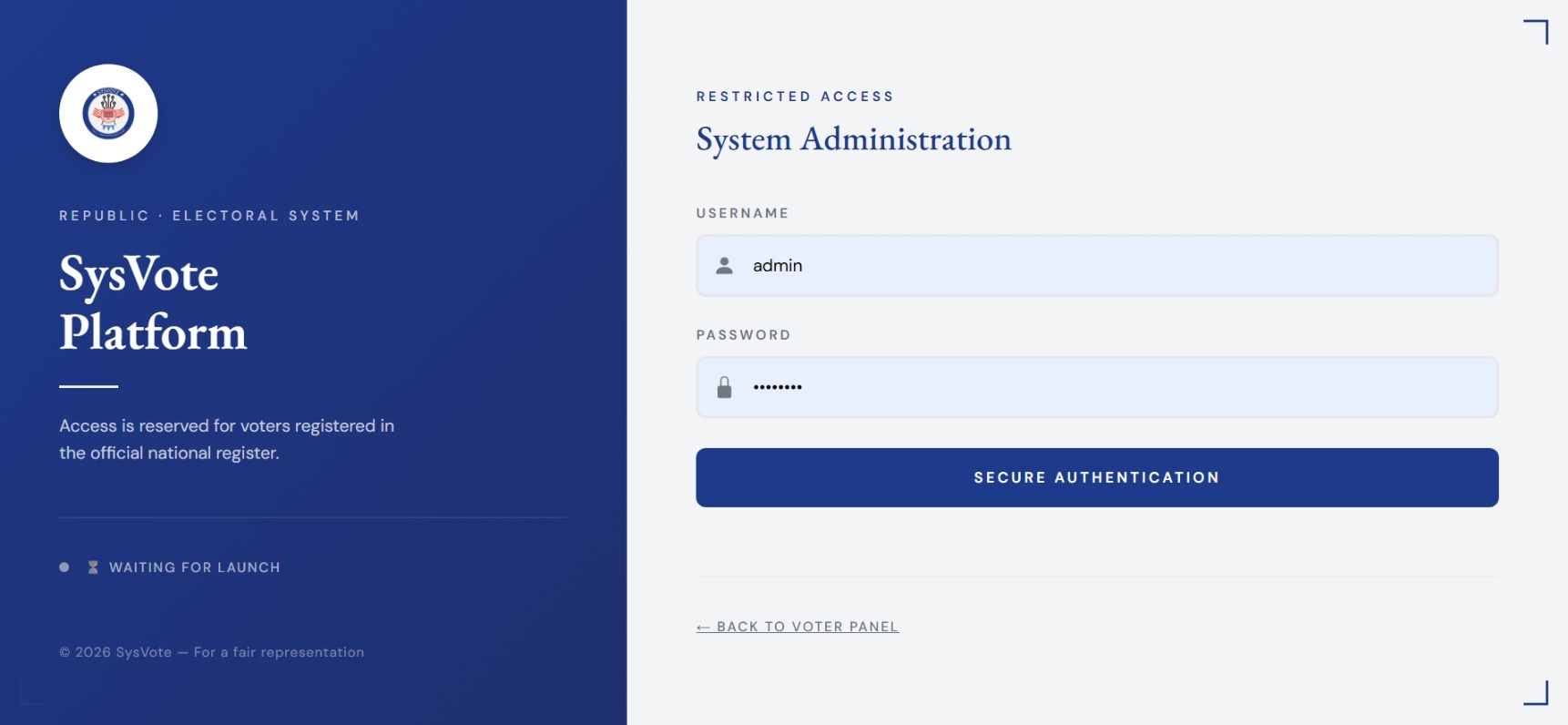
[A2] Admin Login: Role-based credentials interface (Username & Password). Secured with MD5 hash validation and session-level permissions.
SECURE Dual login architecture cleanly separates anonymous voter access from administrative management.
2 System Navigation & Live Countdown

[B1] Live Timer: Dynamic countdown displaying remaining election time. Triggers an automatic system-wide lockout once time expires.
[B2] Quick Actions: Status indicators, real-time alerts, and one-click navigation across management modules.
3 Administrative Home Dashboard
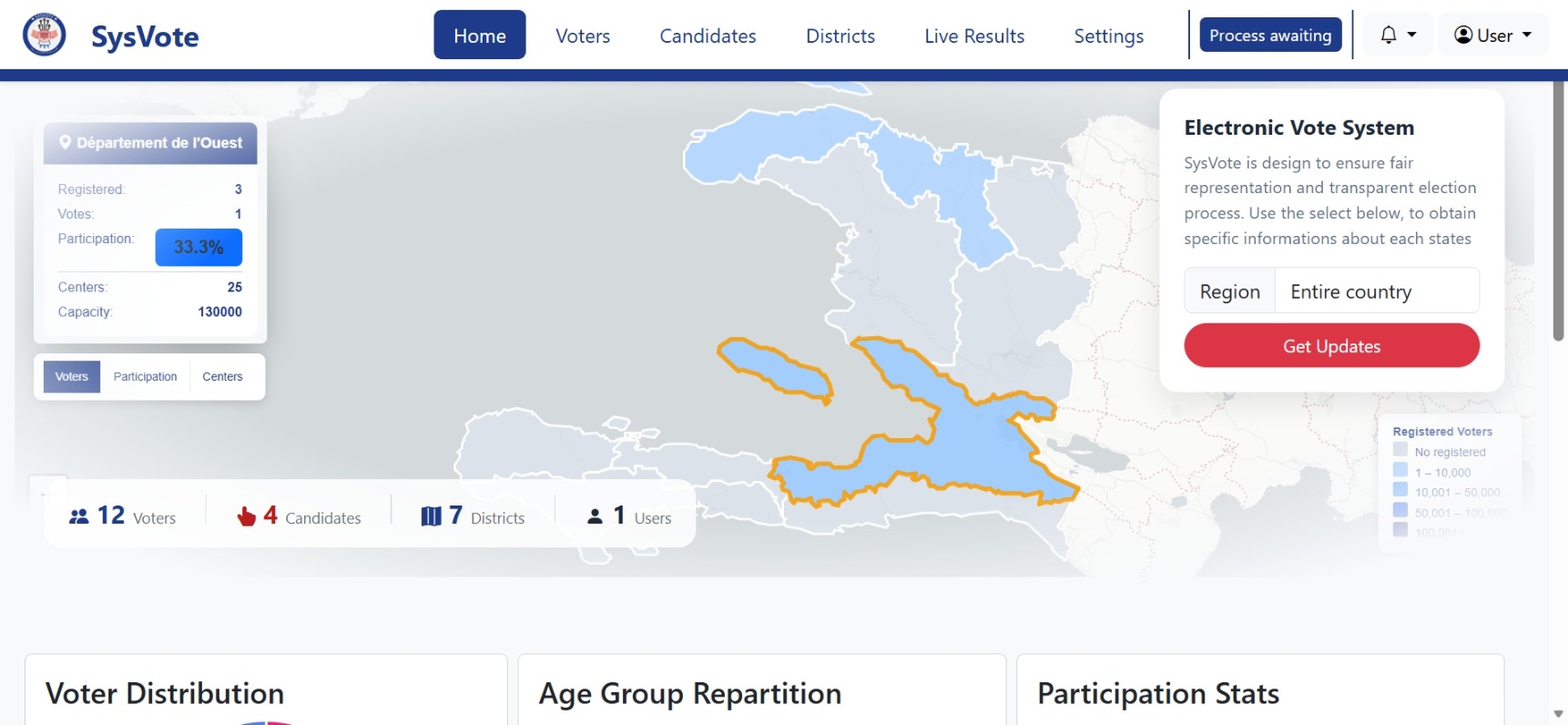
[C1] Live Analytics: Map.js visualization showing real-time vote progression and lead distribution among candidates.
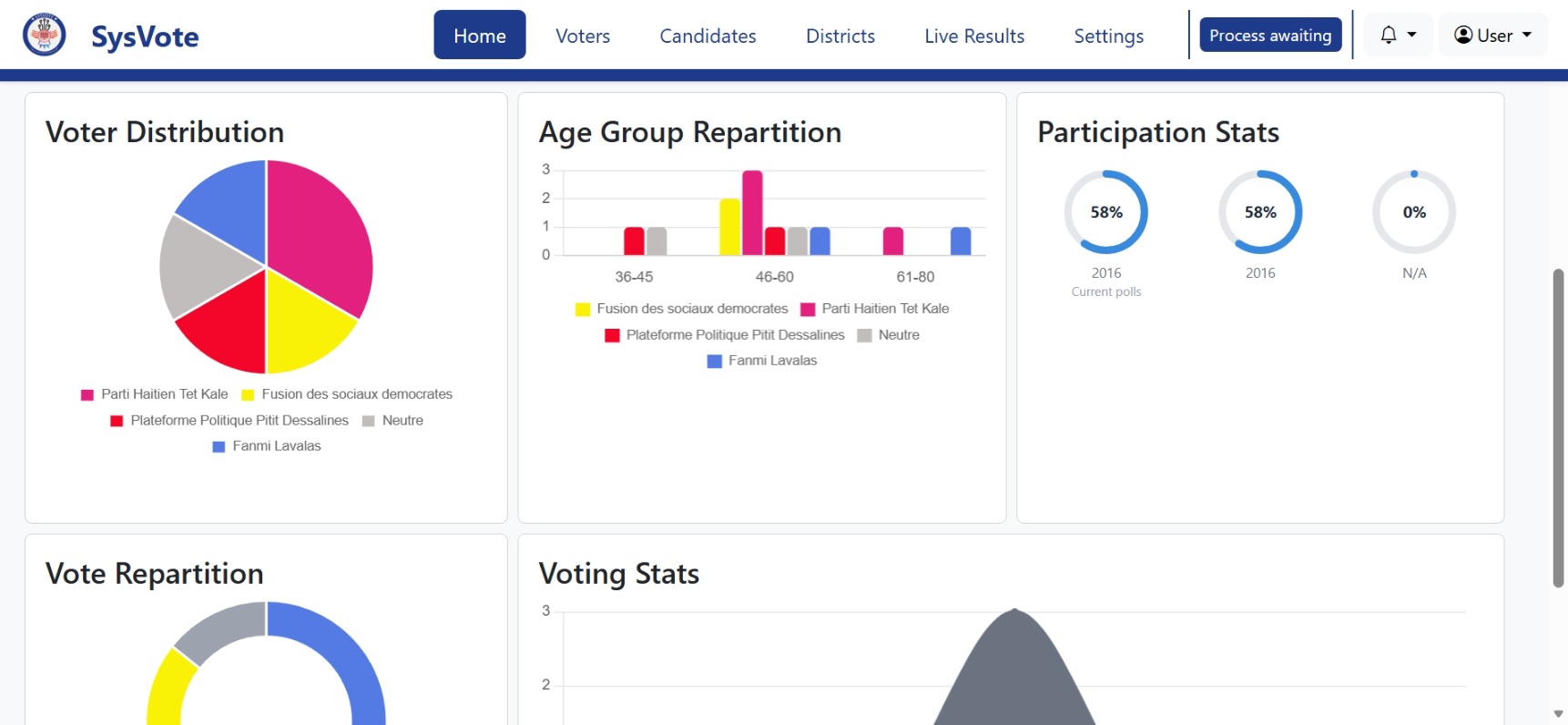
[C2] Global Indicators: KPI cards highlighting total enrolled voters, total votes cast, turnout percentage, and blank ballots.
4 Voter Enrollment & Access Generation
Enrollment Workflows
[D1] Single Entry Drawer: Offcanvas form for registering individuals with real-time IMask input formatting (SSN / NID).
[D2] Bulk CSV Upload: Automated batch processing via DropzoneJS. Displays comprehensive error/success breakdown modal upon upload.
[D3] Member conversion: Integrated DataTables filtering to activate qualified members as active voters based on age and district rules.

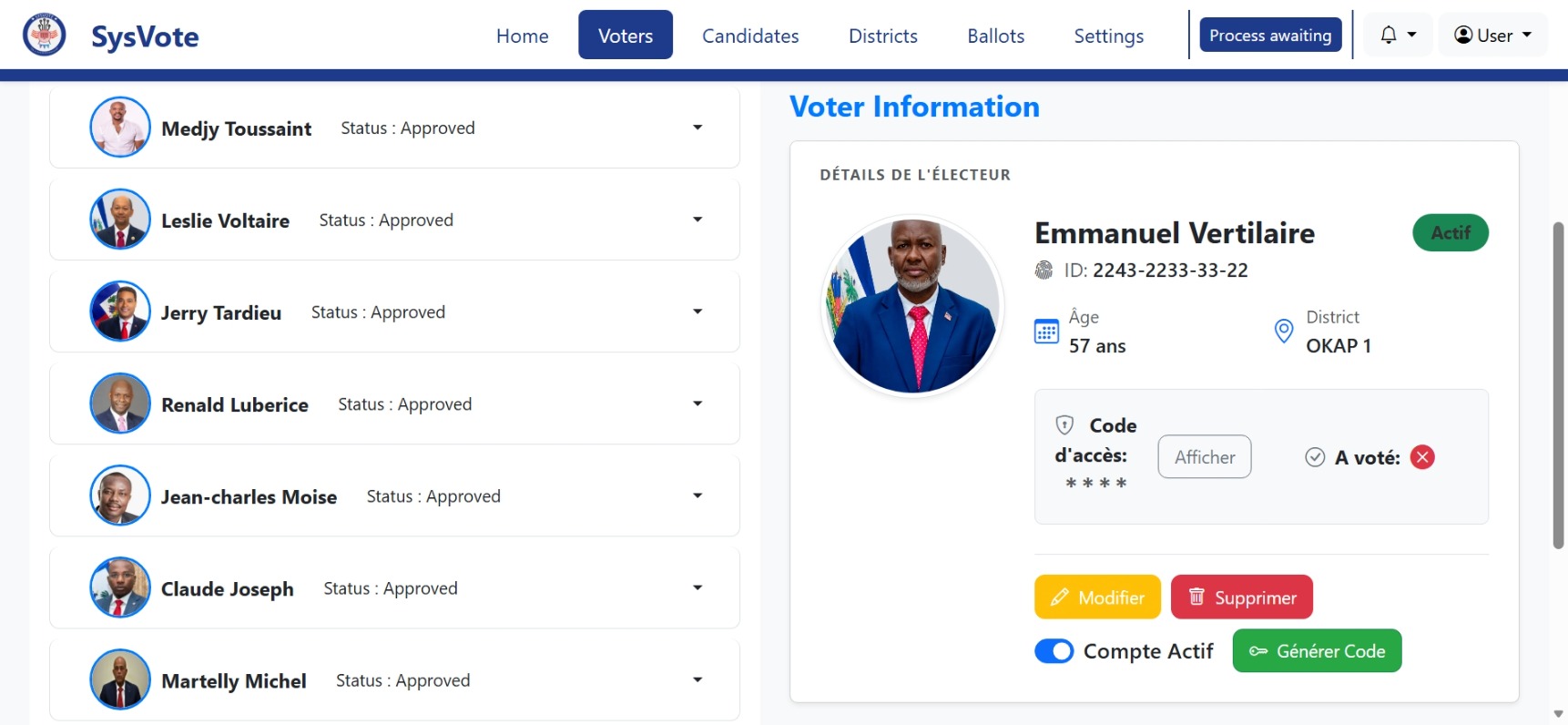
[D4] Access Code Drawer: View voter credentials, generate or reset unique single-use access codes, and preview digital ID card generation.
5 Candidate & Campaign Management
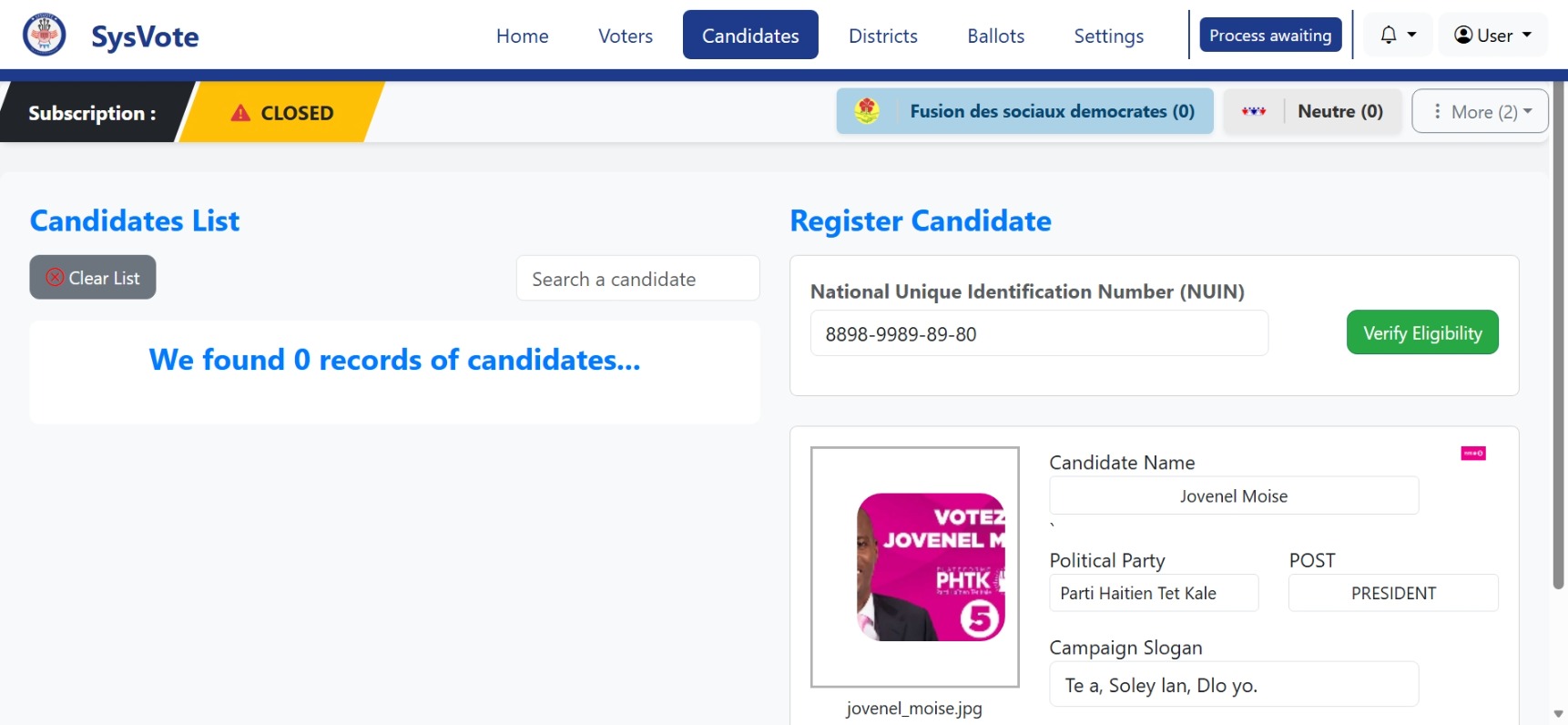
[E1] Profile Management: Add candidate records complete with slogans, assigned political party, photo uploads, and current vote tally tracking.
6 Electoral Districts & Geolocation
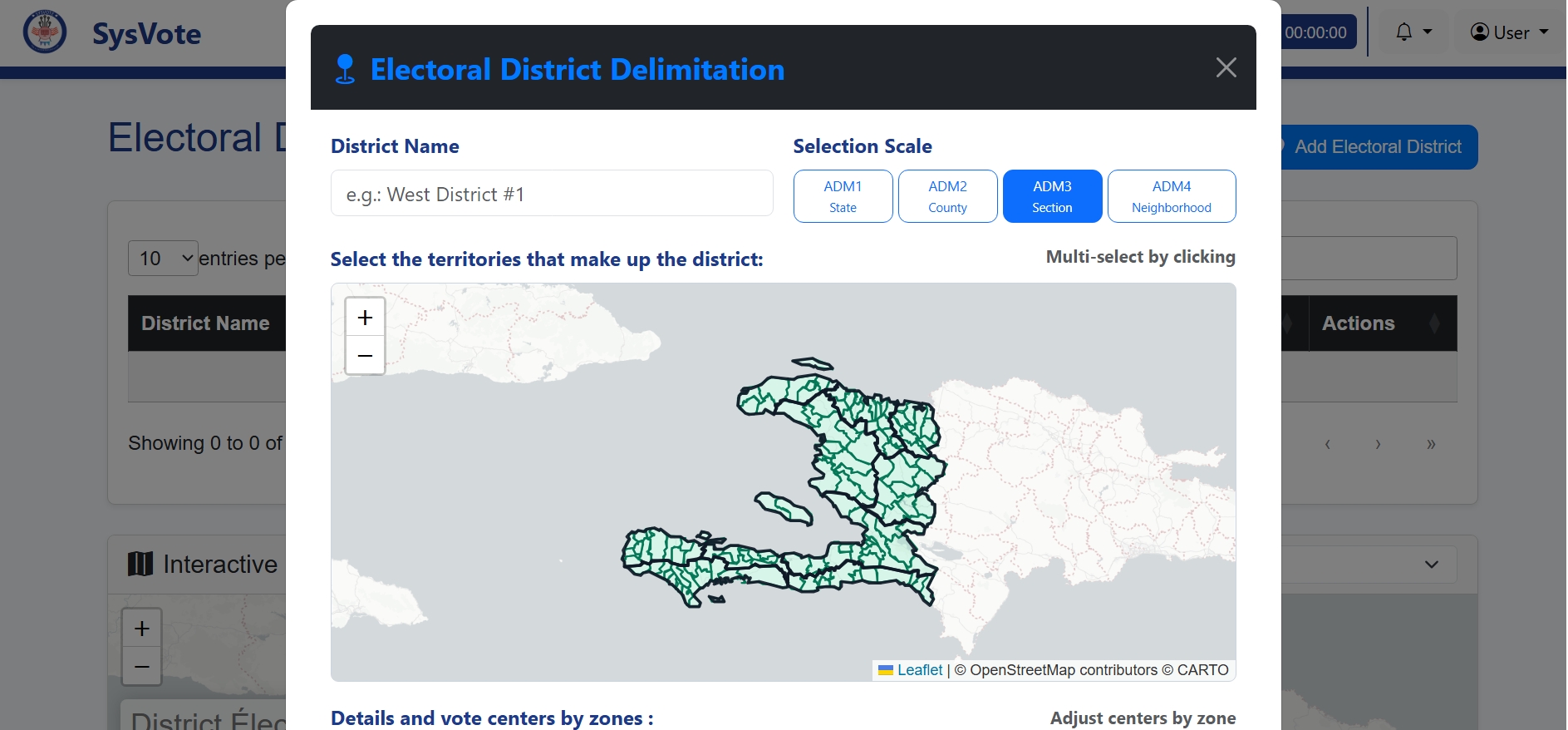
[F1] Regional Controls: Configure district capacity limits, associate voting centers, and assign territory boundaries.
[F2] Geographic Map: Interactive Leaflet map rendering regional centers, state boundaries, and voter distribution density.
7 Drag & Drop Voting Experience
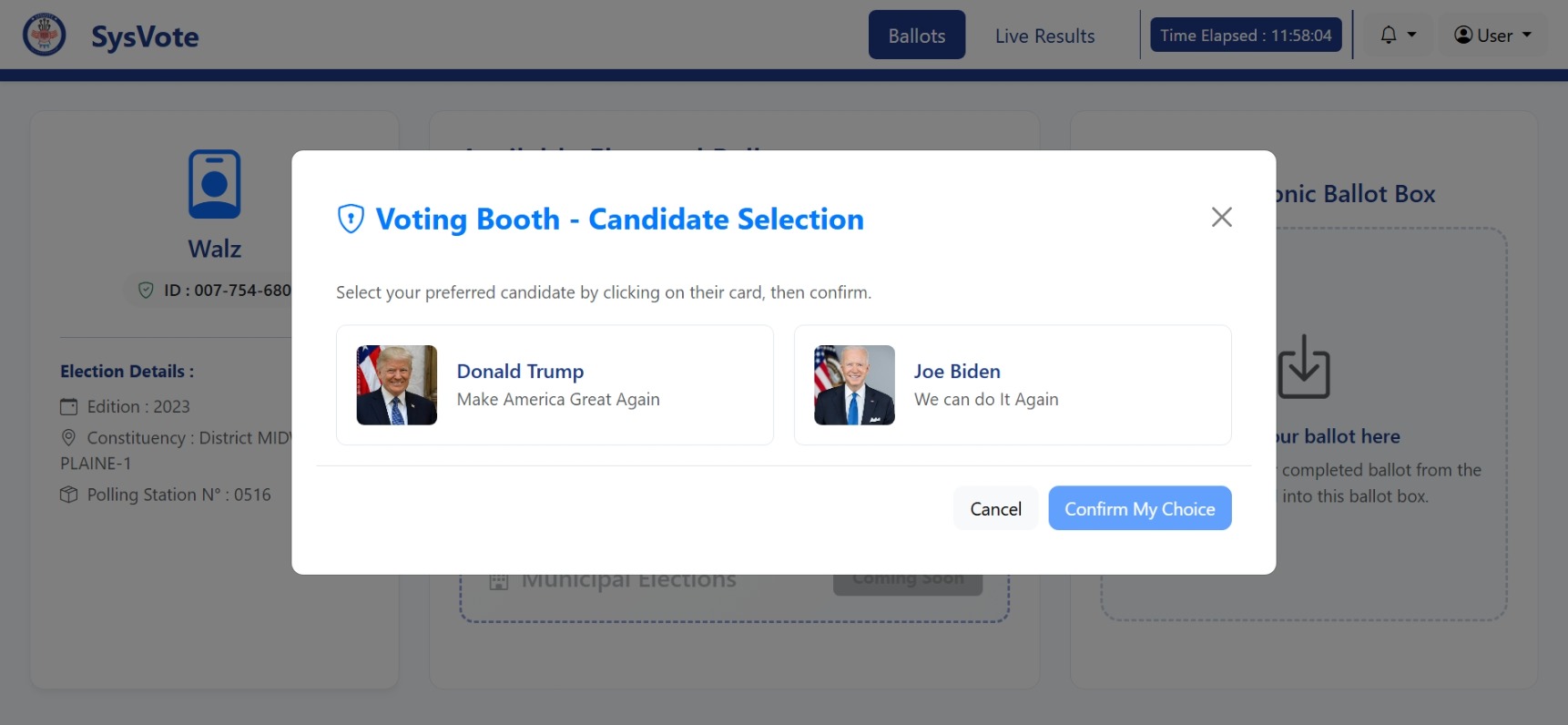
[G1] Intuitive Drag-and-Drop: Voters select their chosen candidate card and drag it into the official digital ballot box.
[G2] Single-Use Lockout: Backend verification invalidates the access code immediately upon ballot submission to prevent multiple attempts.
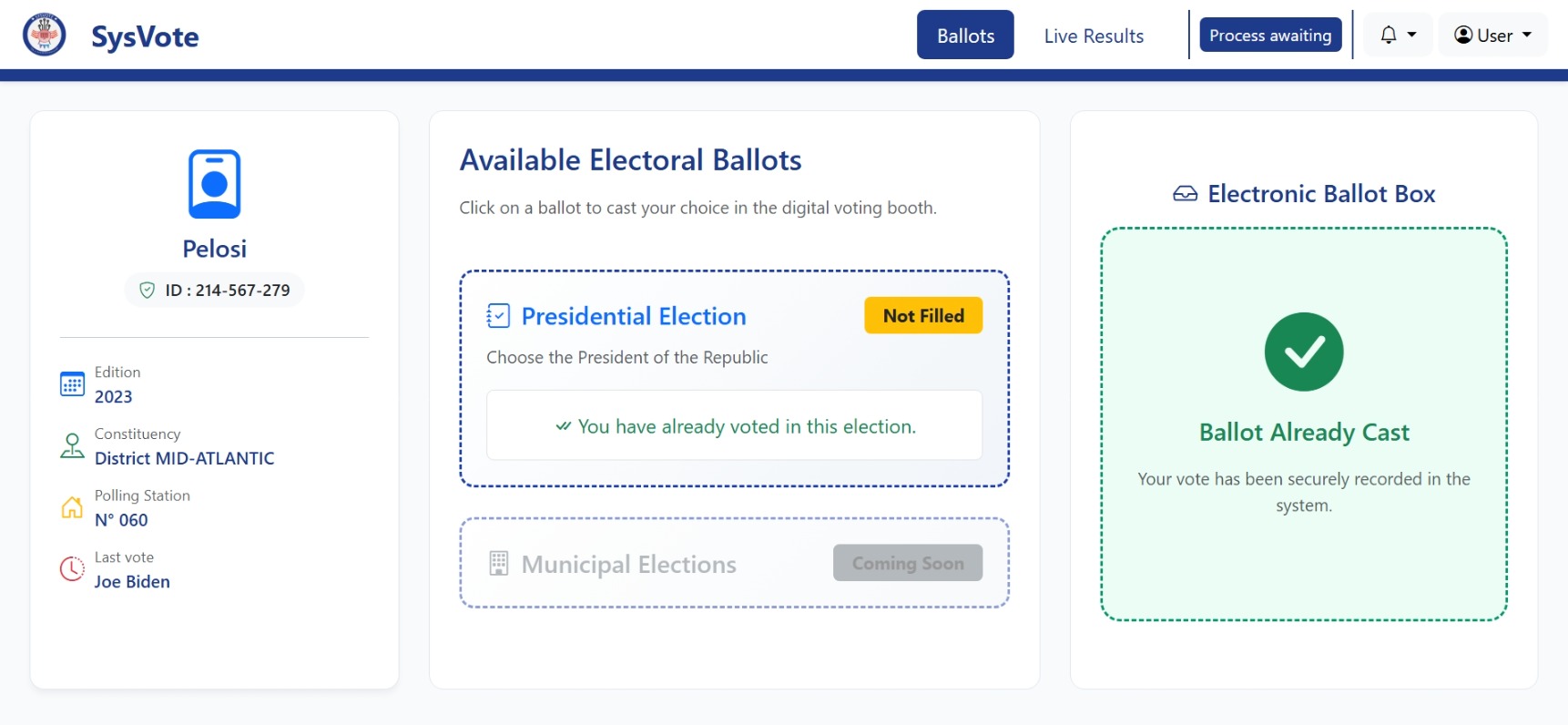
[G3] Choice Confirmation: Explicit confirmation prompt displaying candidate selection prior to encrypting and logging the vote.
8 Live Election Results & Geospatial Analytics
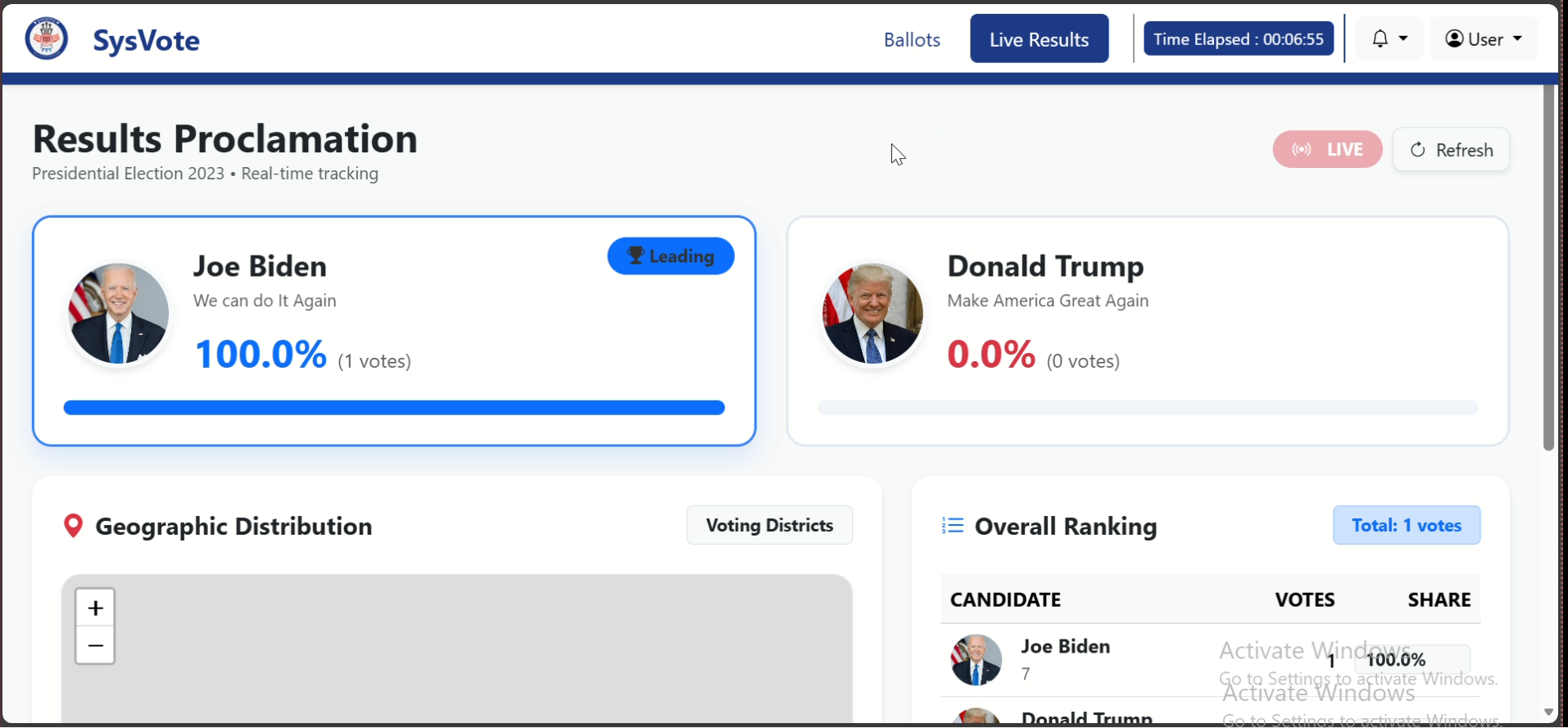
[H1] Dynamic Charts: Real-time vote tallies updating dynamically without requiring page refreshes.
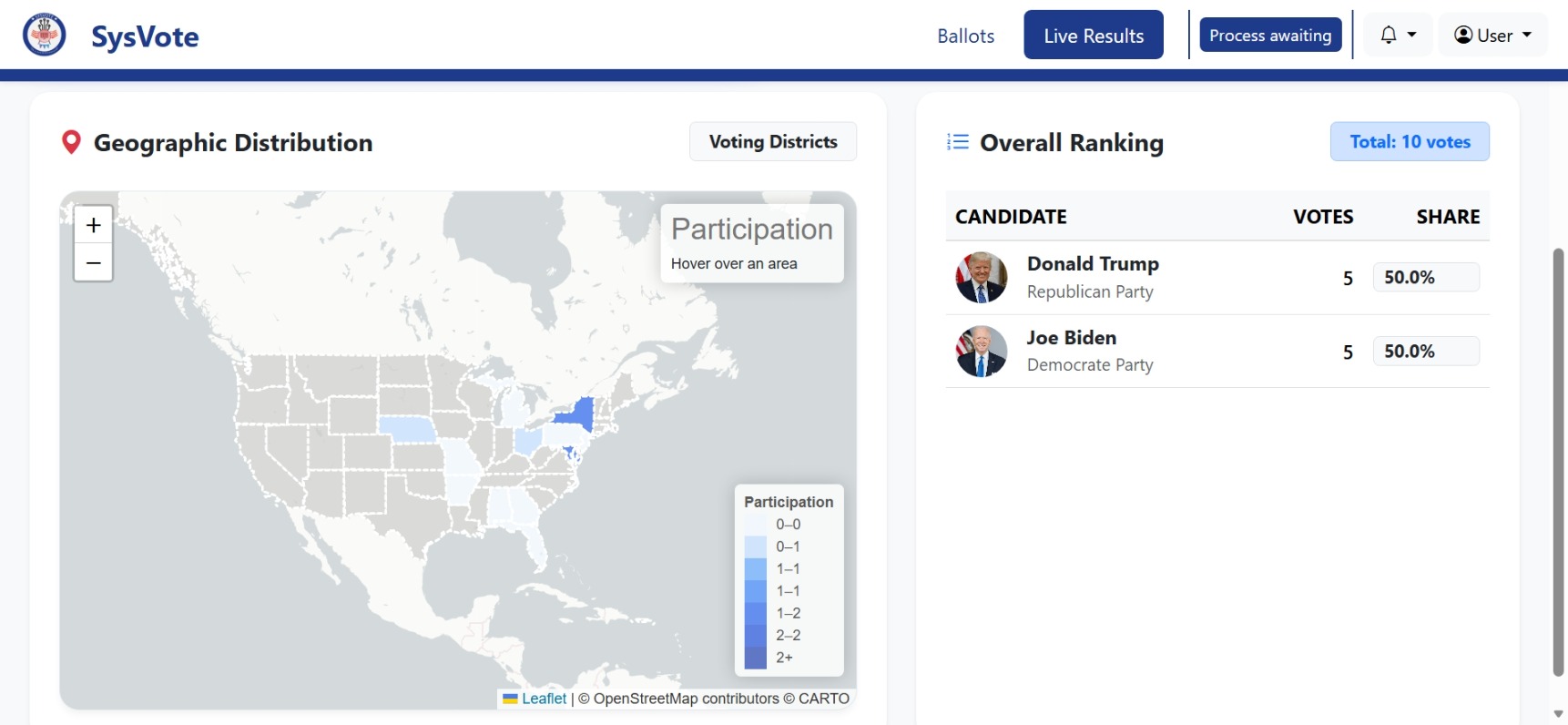
[H2] Regional Breakdown: Color-coded district map illustrating regional victory margins and leading candidates by territory.
9 System Configuration & Parameters

[I1] Election Rules: Define election type, edition year, minimum voting age restriction, and set total duration (hours/minutes).
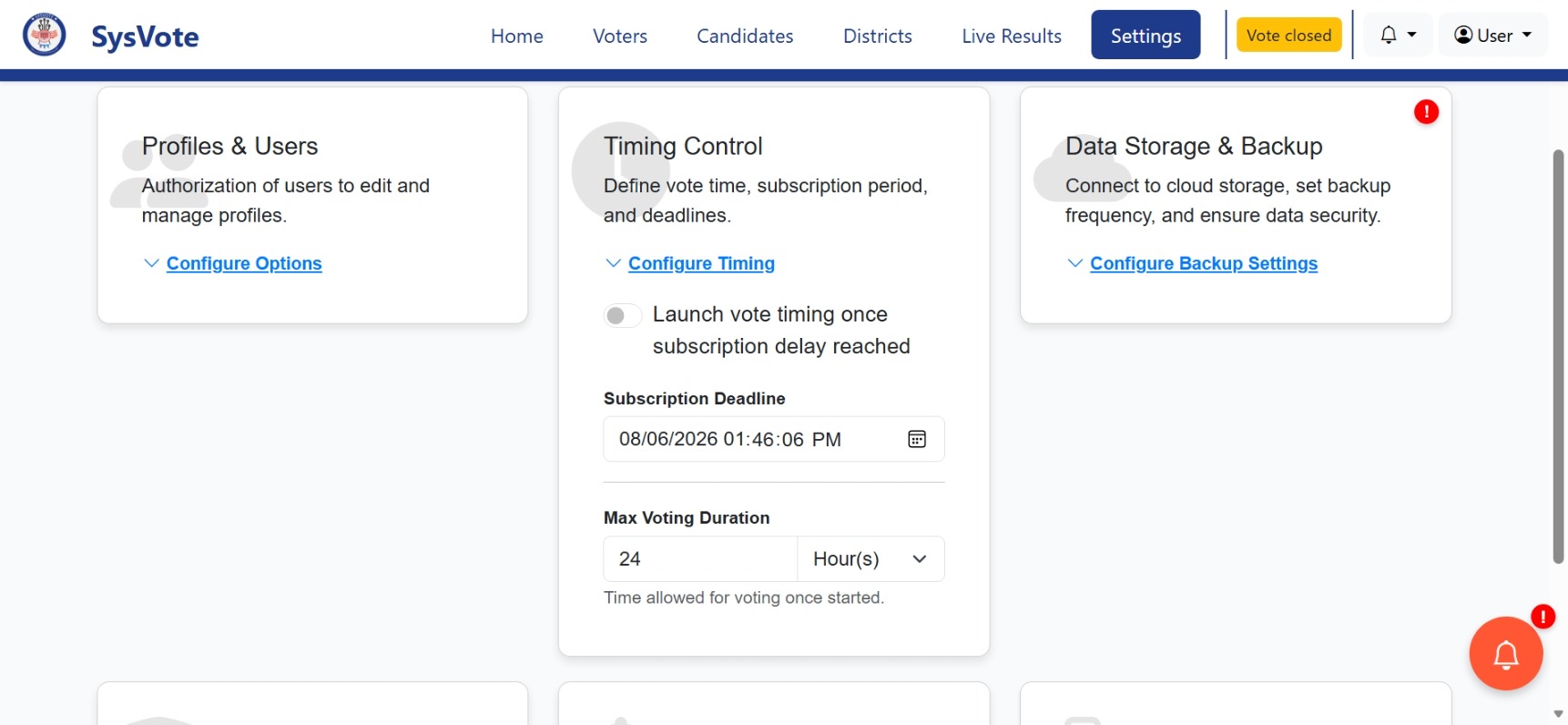
[I2] Timing Control: Define a delay to stop candidates subscription and duration of vote process.

[I2] Identity Masks: Define system-wide mask rules (e.g., SSN, CIN) and regular expressions for ID verification.
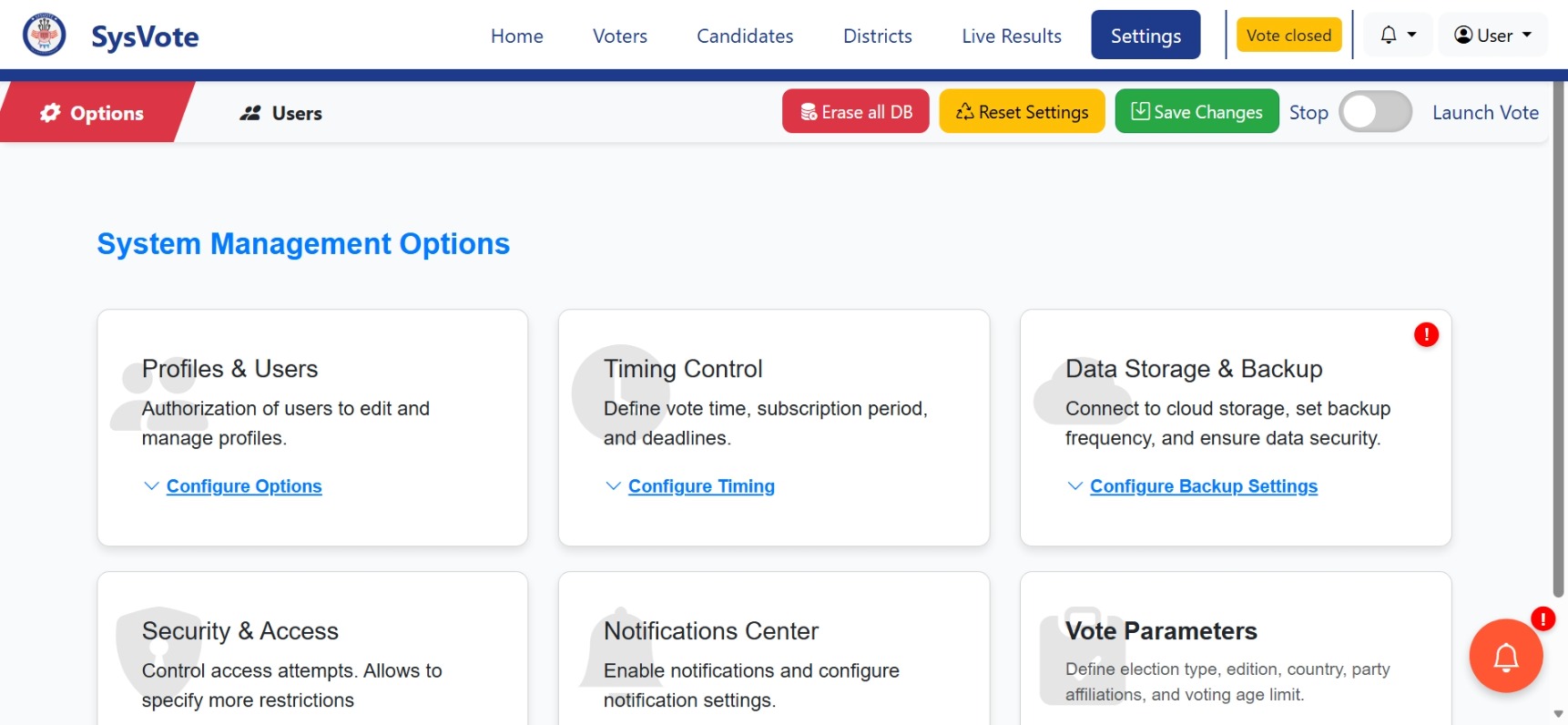
[I3] Security Options: MFA enforcement toggles, login attempt limits, and system event notification preferences.
Architecture
SysVote follows the Model-View-Controller (MVC) pattern with Jakarta EE technologies.
Project Structure Overview
┌─────────────────────────────────────────────────────────────┐
│                     SYSVOTE MVC ARCHITECTURE                │
├─────────────────────────────────────────────────────────────┤
│                                                             │
│  ┌─────────────────────────────────────────────────────┐    │
│  │                   VIEW (JSP)                        │    │
│  │  • assets/ (CSS, JS, images, plugins)               │    │
│  │  • *.jsp pages (dynamic rendering)                  │    │
│  │  • xhr/ (AJAX response fragments)                   │    │
│  └────────────────────┬────────────────────────────────┘    │
│                       │                                     │
│                       ▼                                     │
│  ┌──────────────────────────────────────────────────────┐   │
│  │               CONTROLLER (Servlets)                  │   │
│  │  • HttpServletRequest / Response handling            │   │
│  │  • Session management                                │   │
│  │  • Request routing and validation                    │   │
│  └────────────────────┬─────────────────────────────────┘   │
│                       │                                     │
│                       ▼                                     │
│  ┌──────────────────────────────────────────────────────┐   │
│  │              DAO (Data Access Objects)               │   │
│  │  • JDBC database connections                         │   │
│  │  • CRUD operations                                   │   │
│  │  • Transaction management                            │   │
│  │  • Query execution & result mapping                  │   │
│  └────────────────────┬─────────────────────────────────┘   │
│                       │                                     │
│                       ▼                                     │
│  ┌──────────────────────────────────────────────────────┐   │
│  │              MODEL (JavaBeans / POJOs)               │   │
│  │  • Data representation (candidates, voters, etc.)    │   │
│  │  • Business logic methods                            │   │
│  │  • Relationships between entities                    │   │
│  └──────────────────────────────────────────────────────┘   │
│                                                             │
│  ┌──────────────────────────────────────────────────────┐   │
│  │                 DATABASE (MySQL)                     │   │
│  │  • 13 tables with foreign key constraints            │   │
│  │  • Stored procedures (if any)                        │   │
│  └──────────────────────────────────────────────────────┘   │
└─────────────────────────────────────────────────────────────┘
Key Technologies
- Jakarta EE (Java EE): Enterprise Java platform for web applications.
- Apache Tomcat 10.1.34+: Servlet container and web server.
- MySQL 8.0: Relational database management system.
- Maven: Build automation and dependency management.
- JSP: JavaServer Pages for dynamic view rendering.
- JDBC: Java Database Connectivity for database operations.
- Bootstrap 5.3.3: Frontend framework for responsive UI.
- Chart.js & Leaflet: Data visualization and mapping.
Flow Overview
- User request → Servlet (Controller) intercepts the request.
- Servlet calls appropriate DAO methods to interact with the database.
- DAO executes queries and returns JavaBean objects (Model).
- Servlet sets attributes and forwards the request to a JSP (View).
- JSP renders the response with dynamic data from the Model.
- AJAX requests bypass full page reloads for smoother user experience.
Customization Guide
Learn how to personalize SysVote to match your organization's branding and requirements.
1. Branding (Colors & Logos)
Logo Replacement
- Favicon: Replace
src/main/webapp/assets/images/sysvote.icowith your own favicon. - Header Logo: Located in
assets/images/— update the logo file and reference it in the JSP header. - Login Page Logo: Replace
src/main/webapp/assets/images/logo.pngor the image referenced inlogin.jsp.
Color Customization
- Primary Color: Edit the
:rootCSS variables inassets/css/custom.css:
:root {
  --primary-color: #1a2b4c;
  --primary-light: #2a3f64;
  --secondary-color: #eef2f6;
  --accent-color: #7c3aed;
}
- Button Colors: Override Bootstrap variables in
assets/css/override.css.
2. CSS Styling Overrides
SysVote uses Bootstrap 5.3.3 as the base framework. To customize without modifying core files:
- Create a
assets/css/custom.cssfile (if not already present). - Add your custom styles — they will override Bootstrap and default styles.
- Example customizations:
/* Custom card styles */
.custom-card {
  border-radius: 20px;
  box-shadow: 0 8px 24px rgba(0,0,0,0.08);
  border: 1px solid #e9edf2;
}

/* Custom typography */
h1, h2, h3 {
  font-family: 'Inter', sans-serif;
  letter-spacing: -0.02em;
}

/* Custom dashboard colors */
.dashboard-stat {
  background: linear-gradient(135deg, #1a2b4c 0%, #2a3f64 100%);
  color: white;
}
IMPORTANT Avoid editing Bootstrap core files directly. Always use separate custom CSS files.
3. ID Configuration
Modify identification rules in the Settings section of the admin dashboard or directly in the identity_settings table:
- code_name: Short identifier (e.g., "SSN", "NID", "CIN")
- full_name: Full description (e.g., "Social Security Number", "National ID")
- input_mask: Display mask (e.g., "000-000-000", "000-00-0000")
- regex_pattern: Validation regular expression
-- Example: Add a National ID configuration
INSERT INTO identity_settings (code_name, full_name, input_mask, regex_pattern)
VALUES ('NID', 'National ID', '000-000000-0', '^\\d{3}-\\d{6}-\\d$');
4. Election Configuration
All election parameters are stored in the settings table. Modify them via the admin dashboard or directly in the database:
- election_type: Change the election name (e.g., "Presidential Election", "General Election")
- edition_year: Update the election year
- ageLimit: Modify the minimum voting age
- voting_duration_value & unit: Set the voting period (e.g., 24 HOURS, 30 MINUTES)
- process_status: Manually control the election flow (awaiting, launched, stopped, completed)
5. Adding New Political Parties
Parties can be added through the admin dashboard or via SQL:
INSERT INTO political_parties (party_name, party_code, logo_path, color_code)
VALUES ('New Party', 'NP', 'new_party.png', '#FF5733');
After adding, they will appear in candidate registration forms and results displays.
Troubleshooting
Common installation and runtime issues and their solutions.
electiondata database exists. Verify connection parameters in the Connexion class (src/java/dao).jdbc:mysql://localhost:3306/electiondataTIP If using Docker, ensure the
sysvote_db container is running.
http://localhost:8080/sysvote3.0 or the path defined in your server.TIP Check Tomcat's
webapps folder to confirm the application is deployed.
mvn clean install from the project root to download all required JAR files. Ensure all dependencies are listed in pom.xml.TIP Check that your server supports Jakarta EE (Tomcat 10+).
status is set to 1 (active) in the voters table. Check if the access code has already been used — each code is single-use. You can regenerate a new code from the voter management panel.TIP Check the
votelog table to see if a vote has already been recorded for that code.
conf/server.xml) or stop the process using the port.Windows:
netstat -ano | findstr :8080 then taskkill /PID <PID> /FLinux/macOS:
sudo lsof -i :8080 then kill -9 <PID>
~/.m2/repository) and rebuild.mvn clean install -UTIP Check that your
pom.xml uses the correct repository URLs.
process_status in the settings table is set to launched. Check that voting_duration_value and voting_duration_unit are correctly configured.TIP The countdown starts when the election is launched from the admin panel or when
process_status is updated.
Limitations
Version 3.0: Efficiency at very large scale has not yet been proven. The logic is designed for presidential election simulations. Security is not 100% guaranteed; we recommend an audit by a specialist before professional use. Improvements are planned for future releases.
- Scale: Optimized for up to 50,000 voters in current configuration.
- Security: Basic security implemented; enterprise-grade audit recommended.
- Real-time: Updates every 5 seconds by default — can be adjusted in JavaScript.
- Backup: Manual backup currently; automated backup planned for v3.1.
Licenses
1. License Agreement
Purchasing this application implies acceptance of these terms.
2. Right to Modify
You are authorized to modify the source code as needed for your organization.
3. Redistribution
Redistribution of the software in its original form is prohibited without substantial modifications. Changes must be clearly mentioned.
4. Commercial Use
Use without prior purchase is prohibited. Commercial use requires a valid license.
5. Intellectual Property
All rights remain the property of MajOrWare IT Solutions.
6. Acceptance
Use of the application constitutes acceptance of these terms.
Support & Updates
Image Credits
- Freepik — UI icons and design assets
- Google Images — Reference images used in documentation
- Flaticon — Icon sets used in the application
Contact Us
Company: MajOrWare IT Solutions
Instagram: @majorware
LinkedIn: Renald Occean
Email: contact@majorware.net
Website: www.majorware.net
Need customization or assistance? Our engineering team at MajOrWare IT Solutions is ready to help you adapt SysVote to your organization's specific needs.
Version History
- v3.0.0 — Current release: Major UI overhaul, Docker support, enhanced security features, CSV import.
- v2.0.0 — Added multi-district support, real-time results, and Leaflet maps.
- v1.0.0 — Initial release: Basic voting system with admin panel.
Documentation SysVote 3.0 · MajOrWare IT Solutions · All rights reserved